Stop paying thousands for Odoo
Celerp gives you the core apps a small business runs on - inventory, accounting, manufacturing, CRM - without the consultants, hosting fees, or per-user Enterprise pricing. Free to run yourself; add Celerp Connect to put your whole office on it from any browser, one flat price.
Free, with open-source modules. No credit card required.
Celerp vs Odoo in short
Celerp is a free, self-hosted alternative to Odoo with open-source modules, for small businesses: inventory management, invoicing, double-entry accounting, CRM, purchasing and manufacturing with bills of materials, in one ERP that runs on your own computer with no implementation partner. Odoo Enterprise charges per user; Celerp Connect, which puts your whole office on it, starts at $29 a month at one flat price.
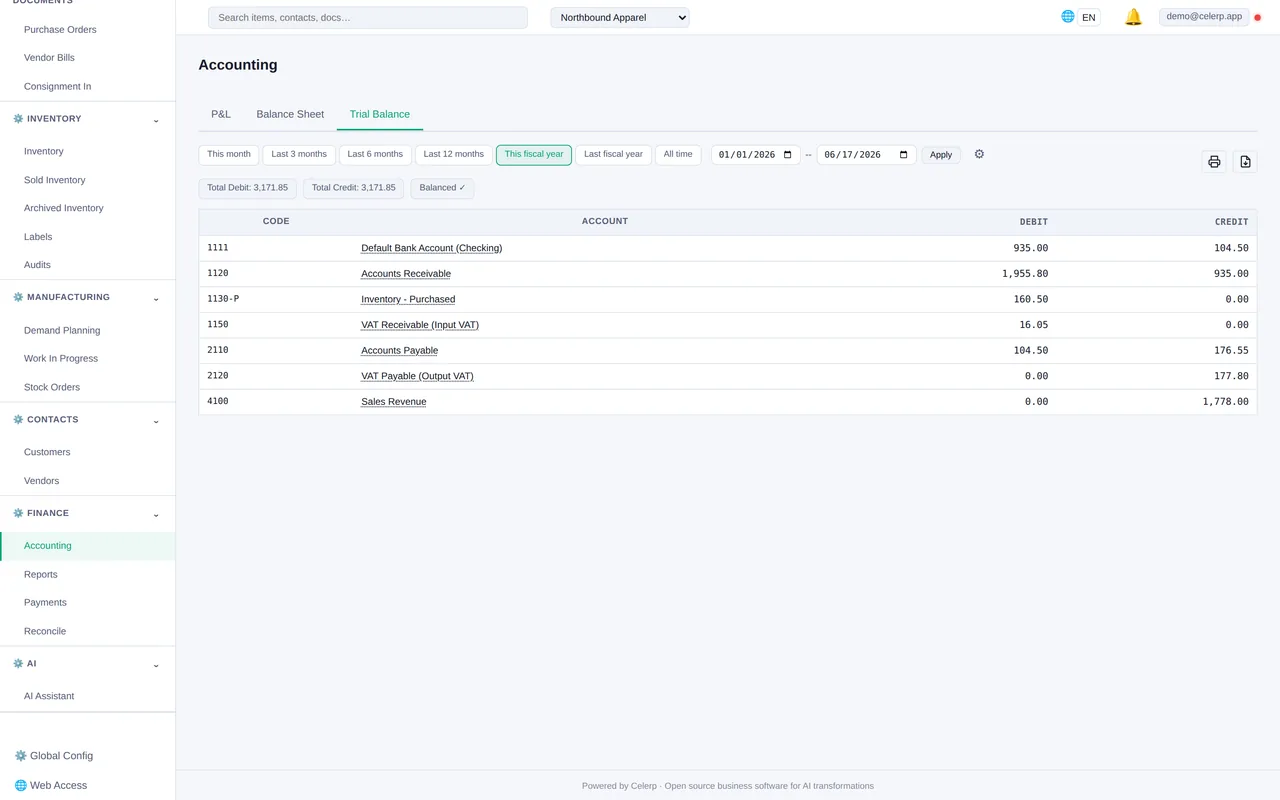
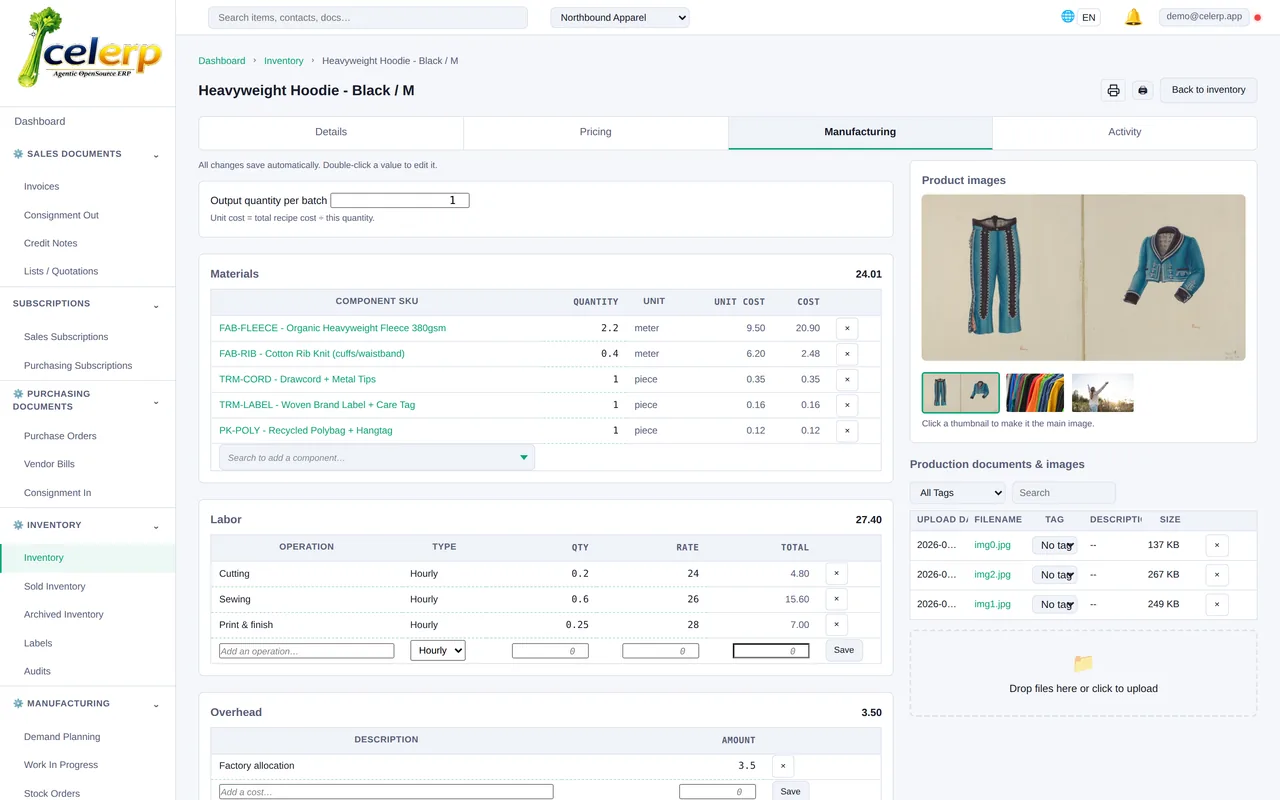
Why businesses switch from Odoo
Odoo is powerful but expensive. Here is what it is really costing you.
You need an implementer
Odoo sells setup separately, through its own Success Packs or certified partners; its pricing page lists implementation as not included. Celerp ships with ready-made setups for your type of business and works out of the box.
Your team needs training
Odoo is configured, not installed, and staff learn it through a partner or courses. Celerp edits right on the page you are looking at, so there is less to learn.
Every year is an upgrade project
Odoo's upgrade service is for paying customers only; on Community, upgrades are yours to run, one version at a time. Celerp updates are free.
Free still means a server
Running Odoo in production means a Linux server, PostgreSQL and someone to maintain them. Celerp runs on the computer you already have, on Mac, Windows or Linux.
Paid features keep stacking up
Accounting, barcode scanning, Studio and the mobile app are paid. On top of per-user licenses, you pay for hosting and implementation. Celerp is free; Connect is one flat price for the whole office.
Odoo Community vs Enterprise: what free really costs
Odoo Community is free to download. Here is what it leaves out, and what the free Celerp app includes.
| Feature | Celerp (free app) | Odoo Community |
|---|---|---|
| Accounting | ✓ Full double-entry accounting with bank reconciliation | The Accounting app (balance sheet and P&L reports, bank reconciliation, bank feeds) is Enterprise only |
| Barcode scanning | ✓ Included | The Barcode app is Enterprise only |
| Version upgrades | ✓ Free updates | The upgrade service is Enterprise only; on Community you migrate yourself, one version at a time |
| Running it in production | ✓ Installer for Mac, Windows and Linux | A Linux server with Python and PostgreSQL; Odoo describes its Windows package as for testing or single-user use; no macOS installer |
| Customization | ✓ Open-source modules, or build your own features with ChatGPT or Claude | A developer for custom modules; Studio is Enterprise only |
Odoo Community is a good choice if you have an Odoo partner on call to set it up, train your staff, run the Linux server and carry you through every yearly upgrade. There is a whole industry of Odoo implementers for a reason. Celerp is built to need none of that: install it like any other app, pick your business type, and start working.
If your Odoo subscription lapses, your database is blocked until you renew. With Celerp, your data stays on your own machine and keeps working.
Real cost comparison (15-user business)
| Feature | Celerp | Odoo Enterprise |
|---|---|---|
| Year 1 cost (15 users) | ✓ Free app; Connect for the whole office from $29/month | About $4,600 in licenses, plus an implementation partner |
| Unlimited users | ✓ | Per-user pricing |
| Setup time | ✓ 2 minutes | Implementation sold separately |
| Manufacturing / BOM | ✓ | ✓ |
| Built-in accounting | ✓ | ✓ |
| Self-hosted / data ownership | ✓ | On-premise needs the Custom plan; Odoo.sh hosting is extra |
| Installs on Mac, Windows or Linux | ✓ | Odoo Online runs in the browser; on-premise production needs a Linux server |
| Version upgrades | ✓ Free, automatic | Included in Enterprise; Community has no official upgrade service, only OpenUpgrade, one version at a time |
| Support | ✓ GitHub community | Expert services not included; sold as Success Packs or through partners |
Odoo Custom plan: $25.50 per user per month billed yearly, or $32 billed monthly, at first-year prices; list prices run about $32-40 after the first 12 months. Implementation and Odoo.sh hosting are extra. For 15 users, Year 1 licenses alone come to about $4,600, plus an implementation partner. Celerp: the app is free; Celerp Connect for the whole office starts at $29 a month.
How we make money
The desktop app is free. We charge for optional Connect features: connector sync (Shopify, WooCommerce, Xero, QuickBooks), encrypted backups, and AI. That is it. No hidden fees, no per-user pricing, no data hostage.
How to migrate from Odoo to Celerp
Celerp reads the backup Odoo's own database manager makes, from Odoo 13 to 17. Backups from Odoo 18 and 19 are not read.
Back up your database in Odoo
In Odoo's database manager, choose Backup and the zip format, which includes the filestore. Celerp cannot read a backup protected with a password or one in pg_dump custom format.
Upload it to Celerp
Install Celerp, choose Move your books from another system, pick Odoo as your current system and upload the zip as it is. If the database holds more than one company, choose the one to import. To import another, upload the backup again.
See what comes across
Before anything is imported, Celerp lists every kind of record in your file or files and shows what comes across, what comes across in part, and what it cannot bring over yet.
Choose full history or a cutover date
Full history recreates every transaction. Cutover starts from a date you choose: balances on that date become opening balances, and open invoices, bills and stock are recreated.
Check the results
Celerp compares its totals with the totals in your file or files and shows any difference. Download the reconciliation pack for your records or your accountant.
Your Odoo database stays as it is. Celerp only reads the backup, so you can keep working in Odoo until you are happy with the result.
What moves from Odoo
Celerp shows this for your own file before you import anything.
Comes across
Chart of accounts, contacts, products, taxes, posted journal entries, invoices, credit notes, bills and refunds with their reconciled payments, stock per product, lot and internal location with its value, and files attached to contacts, products and documents. Draft and cancelled invoices and bills come across as draft and void documents. Invoice and bill lines keep their analytic accounts as tracking options; journal lines do not.
Checked against your file
The trial balance at every month end, each customer's and supplier's open balance, each document's open amount, and stock quantity and value. Each is compared with the figures in your Odoo backup.
Listed, not moved
Draft and cancelled journal entries, off-balance journal items, draft documents without a contact, the entries of other companies in the database, and Odoo's own interface files and the smaller copies it keeps of each picture. Attachments larger than 25 MB, damaged or missing ones, and those on records Celerp does not bring across are left out and listed in the run summary.
Not supported yet
Sales and purchase orders, quotations, CRM, HR and manufacturing records are not read. What they posted to your books, such as invoices, journal entries and stock moves, comes across. Celerp does not report by analytic account.
Free. Forever.
No per-user pricing. Add your whole office for $29/mo.
Full ERP - manufacturing, inventory, accounting, CRM.
Download FreeSource-available. Self-hosted. Free forever.
Frequently asked questions
Is Celerp really free?
Yes. The desktop app is free, with a source-available core and open-source modules - all features included, no paywalls, no hidden fees, and no per-seat charges ever. Create unlimited user accounts; one person is signed in at a time on the free app, and Celerp Connect connects your whole office at once.
Can I migrate from Odoo?
Yes. In Odoo's database manager, back up the database in the zip format, which includes the filestore. Then choose Move your books from another system in Celerp, pick Odoo and upload the zip as it is. Celerp reads backups from Odoo 13 to 17 and imports one company at a time: its accounts, contacts, products, invoices, bills, payments, journal entries, stock and attached files. It then compares its totals with your Odoo figures.
Does Celerp have the same features as Odoo?
Celerp covers the core of what a small business runs on Odoo: manufacturing, inventory, accounting, CRM and purchasing. Some things work differently: bulk entry is click-to-edit right in the table, an AI assistant is included, and there are no per-seat fees.
What about Odoo Community edition?
Odoo Community is free, but accounting, barcode scanning and version upgrades are paid, and running it in production means a Linux server. Celerp includes full accounting with bank reconciliation and barcode scanning in the free app, installs on Mac, Windows or Linux, and updates for free.
How does the whole office connect?
On the free app, one person is signed in at a time - perfect for a single workstation. To put your whole office on it at once, add Celerp Connect: it turns any Mac Mini or PC into a secure server everyone reaches from their browser, in the office or remotely. One flat price, never per user - and your existing server works too.
Switch from Odoo today
Free, source-available, self-hosted. Scales from a single user to your whole office. No lock-in.
Source-available. Self-hosted. Free forever.